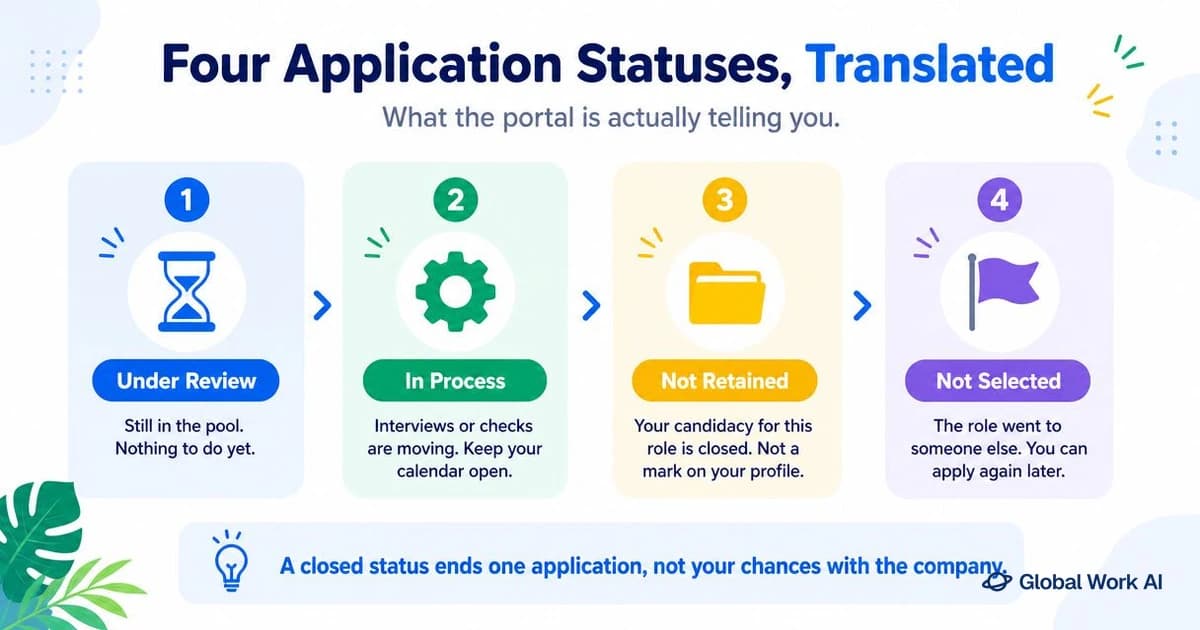
You open the candidate portal, and the line next to the job you applied for reads "Not retained." No explanation under it, no name at the bottom, nowhere to click. The word "rejected" appears nowhere on the screen, so you sit there deciding whether this is a no, a pause, or a system label nobody meant you to read closely.
The wording is strange because it was never written for you. The phrase is often used as a candidate-facing closing status or disposition label, depending on the employer's ATS configuration: a label applied when a candidate record is closed out for a requisition. Labels like this tend to be chosen for recordkeeping, not for clarity, which is why they sound like filing categories instead of decisions.
This article translates the status: what it means in practice, a table comparing it with the other statuses on your portal, how it appears in Workday, Taleo, iCIMS, and Greenhouse, how federal notices differ, what the timing tells you, one email you can send, and a closing checklist.
Quick answer:"Not retained" on a job application almost always means the employer has closed your candidacy for that specific role: your application was received, reviewed, and is no longer moving forward. It is wording pulled from the applicant tracking system the employer uses, not a separate stage of the hiring process, so it does not signal a ban on applying again or any kind of list. The exception is certain government portals, where stage codes are distinct from each other and the status should be read literally as the step where your application stopped.
What "Not Retained" Means on a Job Application
Read the phrase as a verb about the record, not a judgment about you. To "retain" a candidate in recruiting software means to keep that person in the active pool for a requisition. The employer configures which statuses candidates can see and which reasons are available for closing a record, and "not retained" is one of the neutral options those configurations can include. The record stops being active. That is the whole message.
That is also why the status is a closing code rather than a waiting room. Statuses like "under review" or "in process" describe a candidate who is still attached to an open requisition. A disposition code is applied at the end, when someone decides the record will not advance. If the employer wanted to keep you available for a later stage, there is no reason to close the record at all.
Who applies the code varies, and that matters for how much to read into it. Some closures follow a screening question you answered outside the requirement. Some follow a recruiter reading your resume for a minute. Some follow a hiring manager screen where two people discussed your background. The label looks identical in all three cases, because it exists to close the record, not to describe the conversation behind it.
The status carries no instruction about your future. By itself, it describes the outcome for this requisition and does not reveal how the employer handles future applications. Treating it as a verdict on your candidacy in general reads more into it than the wording supports.
What really happens
75% of all resumes never reach human recruiters. Applicant Tracking Systems (ATS) reject them automatically — often by mistake
Not Retained vs Not Selected vs Under Review: Status Translation Table
Most portals mix closing codes and stage codes in the same list, which is the real source of confusion. Once you know which category a label belongs to, the job application status meanings stop feeling arbitrary. Here is how the common ones line up.
Status you see
What it usually means
Process open or closed
What to do
Not retained
Your record was closed for this requisition after review
Closed
Log it, check your application fields, decide about one email
Not selected
Someone else was chosen, or you were ruled out at a specific stage
Closed
Same as above; treat it as final for this role
No longer under consideration
Closing code with slightly firmer wording, same practical meaning
Closed
Log it and move on to other applications
Position closed or requisition closed
The opening itself was cancelled, filled, or put on hold
Closed
Nothing to fix on your side; watch for the role reposting
Received or submitted
The system has your application; no human step recorded yet
Open, earliest stage
Wait; nothing to act on
Under review or in review
Attached to an open requisition at a screening step
Open
Keep applying elsewhere; no follow-up needed yet
In process
Umbrella label for any active stage between screening and offer
Open
Be reachable; this label can sit still for weeks
Interview or interviewing
You are on the schedule or in the interview loop
Open, late stage
Prepare and confirm logistics
Offer or offer extended
A decision has been made in your favor
Open, final stage
Review terms before responding
Not referred (government portals)
You were not forwarded to the hiring agency after qualification review
Closed for that announcement
Read the eligibility details in your notice
Two notes on reading this table. Not retained vs not selected is a difference in vocabulary, not in outcome: both are closing codes, and which one you see depends on how your employer configured its system. And an open status is not a promise. "In process" that has not moved in two months usually means the requisition is stalled, not that you are being quietly evaluated.
How the Status Looks in Applicant Tracking Systems: Workday, Taleo/Oracle, iCIMS, and Greenhouse
One caution before the breakdown. Every major system lets the employer rename stages, choose which statuses candidates can see, and decide whether a closure triggers an email at all. What follows is the typical pattern, not vendor-confirmed behavior, so your portal may use different words for the same thing.
Workday
Workday gives you a candidate home with your applications listed and a status next to each one. Candidates often see short labels like "Under Consideration," "Not Selected," or a not retained Workday variant, depending on the employer's wording. Because your login persists across that employer's openings, Workday is the system where you are most likely to notice the status change on your own before any email arrives.
Taleo and Oracle Recruiting
Taleo and its Oracle successor are the most likely to show you a stage name that reads like internal shorthand, because the stage list was built for recruiters. A Taleo candidate status may show steps and dispositions in the same field, so you see a review stage one week and a closing label the next. Whether the candidate-facing view keeps updating at all depends on the employer's setup, so the email may end up being your only signal.
iCIMS
An iCIMS application status is often visible in a candidate profile that tracks several applications at once. An employer can configure a notification when an application is closed, and the wording in it is template text the employer selects, which is where phrases like "not retained" and "no longer under consideration" tend to appear. If the message names no specific stage, it is not hiding one; the template simply does not include that detail.
Greenhouse
Greenhouse is built around internal pipeline stages, and how much of that a candidate can see depends on the employer's implementation. You may have no status page to check at all, in which case you learn the outcome from a rejection email. The absence of a portal is not a bad sign about your application; it only reflects how that employer set things up.
The practical takeaway is that a candidate not retained in one system and one marked rejected in another are in the same position. Comparing wording across employers tells you about their software, not about how close you came.
Government Portals: Why "Not Referred" and "Not Retained" Are Not the Same
Federal hiring runs in explicit stages, and the status you receive names the stage where your application stopped. That makes these notices more informative than a private employer's closing code, so read them literally. The sequence generally moves from application received, to a review of whether you meet the announcement's qualifications, to referral of qualified applicants to the hiring official, to interviews and selection.
"Not referred" means you were evaluated against the announcement and not forwarded to the hiring agency. That outcome usually traces back to the qualification review: a missing document, a self assessment answer that your resume did not support, eligibility that did not apply to you, or a specialized experience requirement the reviewer could not confirm from what you submitted. The hiring official never saw your package.
"Not retained" or "not selected" on a federal announcement usually points further down the line, but the exact meaning varies by announcement, so check the wording of your notice and the status history for that announcement rather than assuming. In many cases it follows referral: your package reached the hiring office and the selection went another way. If a friend got one status and you got the other for similar roles, you may not have been at the same point in the process, and the fixes differ.
So these notices are worth rereading instead of deleting. "Not referred" points you at documentation and at the alignment between your questionnaire answers and your resume. A notice from the selection stage tells you the package worked and the decision was comparative.
Why It Happens: Six Realistic Reasons Behind the Status
Sorting the reasons by whether they say anything about you is more useful than ranking them by likelihood, which nobody outside the company can know.
The requisition closed or went on hold. Budget changes, reorganizations, and hiring freezes end openings mid process. Some employers then close every active record with a neutral code, which is why candidates who never heard from a recruiter can get the same status as candidates who interviewed. This one says nothing about your application. If the posting looked thin or ran for months without movement, the signals in our guide to spotting ghost jobs are worth a read.
An internal or referred candidate advanced. When someone already inside the company or introduced by an employee fits the role, external applications often get closed in a batch. Again, not about your resume.
A screening question ruled you out. Many applications include knockout questions: work authorization, willingness to work a specific shift, on site location, a required license, a minimum years of experience answer. One answer outside the required range can close the record without any human reading further. This is about the application, not your ability.
A required field was blank, mismatched, or formatted oddly. Employment dates that do not parse, a missing employer name, a resume that did not attach, a duplicate application created by two browser tabs. These are mechanical and fixable, and the most frustrating category, because you cannot see them from outside.
Someone matched the required qualifications more closely. A comparative decision at a screening or hiring manager screen. This one is partly about you, but only relative to a pool you cannot see.
The role was rewritten after posting. Scope changes mid process are common, especially on newer teams. The job you applied for may no longer be the job being filled, and the system closes the old applicant pool.
What the Timing Tells You (Next Day, Two Weeks, Two Months)
Timing is the one piece of evidence you actually have, and it narrows down which stage closed your record. Treat it as a signal, not proof.
Within a day or two. A closure this fast usually points at an automated or near automated filter: a knockout question, a required field, a duplicate record, or a bulk closure after the requisition shut down. It is also possible that a recruiter screened a small pool quickly on the day you applied. Fast does not mean nobody looked, but it does mean the review was short.
Roughly one to two weeks. This window is consistent with several things: a recruiter working through a batch of applications, a hiring manager screen on a shortlist, or a closure once someone else advanced. Timing alone cannot tell you reliably which stage ended your record.
A month or more. Long gaps usually mean the pipeline moved ahead without you and your record was closed when the requisition was finally filled or cancelled. Another possible explanation for a long gap is a bulk cleanup, where every remaining open record is closed at once.
If the status came back fast, check the application itself before rewriting your resume. Open a saved copy of what you submitted, or start a new application at the same employer to see the questions, and verify these fields: work authorization and sponsorship answers, location and relocation, on site or hybrid availability, start date, salary expectation if required, licenses and certifications, employment dates on every entry, the "have you previously worked here" question, and whether your resume file attached. Our guide on how to fill out a job application form covers the ones that trip people up.
Can You Ask Why? One Email and When to Send It
You can ask. A single concise, courteous message is generally a reasonable way to ask, though the employer may not respond. What you should not expect is an answer: many employers have a policy against giving individual feedback, and recruiters working several requisitions may never see the message.
Send it within a week of the status change, while the requisition is recent enough for someone to recall it. Address it to the recruiter if you have ever exchanged email with one, and to the careers or talent inbox on the posting if you have not. Reference the requisition number, because that is how the record is findable.
Subject: Application for [Job Title], requisition [number]
Hello [Recruiter name or Hiring Team],
Thank you for reviewing my application for [Job Title] (requisition [number]). I saw the status update that my application is not being retained for this role.
If you are able to share it, I would appreciate knowing whether the decision came down to a specific qualification or requirement. I am applying for similar roles and would like to target my materials better.
Either way, thank you for the time spent on my application. I would be glad to be considered for future openings on your team.
Best regards,
[Your name]
[Phone] | [Email]
Keep it to that. No case for reconsideration, no attachments, no second message if there is no reply. If you want the broader rules for timing, channels, and what to do when nothing comes back at all, those belong in our guide to following up on a job application.
Reapplying to the Same Company
The status itself only reports the outcome of that requisition and does not tell you whether the employer has any reapplication rules. The useful distinction is between a new application and a repeat of the same one.
A different requisition number is usually a separate application; check the employer's instructions before applying. A different team, level, or location counts as new, even if the job title is similar. Do not mention the earlier outcome unless a question asks about prior applications.
The same requisition reposted is a repeat. An identical package rarely changes anything, so resubmit only if something concrete has changed: a new certification, a corrected field, work authorization now in place, or experience you have since gained. If roles you want keep reposting with no change on your side, that pattern belongs with the other reasons applications go unanswered in our piece on job applications with no response.
64%
100%
From black holes to responses
We optimize your resume for ATS and make sure it gets to the humans who actually make decisions
In practice, yes. The not retained status meaning is that your record has been closed for that requisition and will not advance. The softer wording comes from the disposition code list in the employer's software, not from any intention to leave the door open.
Does "application not retained" mean a human never read my resume?
Not necessarily. The same code is used whether the record was closed by a screening filter, a recruiter review, or a hiring manager decision, so the label alone cannot tell you. Timing is your best clue: a closure within a day or two is more consistent with a filter on required fields or screening answers.
The portal and the email say different things. Which one is right?
Neither source is automatically authoritative: an email is a snapshot of one moment, and the portal view depends on what the employer chose to show. If the two conflict and it matters to you, ask the recruiter or careers inbox to confirm the status, and keep your other applications moving in the meantime.
Is "in process" for two months better than "not retained"?
It is better only in the narrow sense that the record is still attached to an open requisition. It is not a sign of progress. A long stall usually means the requisition is slow, paused, or waiting on a decision about someone else, so keep your other applications moving.
Can I be blocked from applying again after this status?
The status alone does not indicate a block; check the employer's reapplication policy for any restrictions. Otherwise, apply to other openings on their own merits, including at the same employer.
Does asking for a reason hurt my chances later?
One short, courteous message does not. What creates friction is repeated emails, messages to several people at once, or arguing the decision. Send it once and accept whatever response arrives.
Next Steps Checklist for Your Job Search
Work through this once, then put your attention back on active applications.
Log the outcome with the date, requisition number, status wording, and where you saw it. One row in your job application tracker is enough.
Note how long it took from submission to status change, and match it to the timing patterns above.
If the closure was fast, review the application fields listed earlier, especially work authorization, location, shift availability, licenses, and employment dates.
Confirm your resume attached and that you did not create a duplicate application.
Check whether the posting is still live. A removed posting points to a filled or cancelled requisition, not to your materials.
Decide within a week whether to send the one email, then send it or drop the idea.
Mark a date to check that employer's careers page again, and apply to any new requisition that fits.
Fix what the review surfaced in your base resume and application answers.
Mark the application closed in your tracker and continue with active applications.
A diagnostic for applications that disappear without a reply. Audit your last 30 applications, find which of four stages is breaking, and fix that one instead of sending more.
A follow-up guide for applications that went quiet. Wait windows by stage, a channel-by-situation table, and six short scripts you can adapt in two minutes.
A copy-and-adapt template for online job applications, field by field. Covers the answers most people stall on: salary expectations, reason for leaving, contact permission, and knockout screening questions.
A tool-agnostic spec for tracking applications: which columns earn their place, one status vocabulary with transition rules, and the formulas that tell you what is due. Build it in Sheets, Excel, or Notion in one evening.