

04 Sept 2026
Panel Interview: What to Expect and How to Handle Four People at Once
Who sits on the interview panel, who to look at when you answer, and how to handle several interviewers at once without losing the thread.
15 Sept 2026

A recruiter emails with a proposed interview time. It works for you—but should you simply say yes? What if there’s no time zone, you need another date, or you’re no longer interested?
Your reply doesn’t need to be elaborate. It should show interest, make your availability clear, and resolve any details needed to arrange the meeting.
Quick answer: Aim to respond within one business day. Thank the sender, confirm your availability, and repeat the date, time, and time zone. Mention the format if it’s known. If the proposed time doesn’t work, offer alternatives; if something important is missing, ask.
An interview invitation is a request to discuss your experience and suitability for a role. It may come from a recruiter, hiring manager, or scheduling coordinator.
When an employer contacts you, read the full message before replying. Check the company name, job position, proposed date, and any preparation instructions.
Your response should help the sender establish:
“Thursday works” may be enough in some conversations, but “Thursday, [Month Day], at 2:00 p.m. Eastern Time works for me” makes a misunderstanding easier to spot.
Accepting a job interview means agreeing to a conversation, not accepting employment. You can continue assessing the opportunity throughout the interview process.
Try to respond promptly, ideally within one business day. This is a practical guideline rather than a fixed rule: follow any deadline in the employer’s email, especially if the interview is approaching.
A prompt response helps with scheduling, but taking time to check your calendar is perfectly acceptable. If you need longer, acknowledge the invitation and say when you’ll follow up.
Subject: Re: Interview Invitation — [Job Title]
Hi [Recruiter’s Name],
Thank you for inviting me to interview for the [Job Title] position. I’d be happy to speak with the team.
I need to check a prior commitment before confirming my availability. I’ll get back to you by [day and time, including time zone].
Best regards, [Your Name]
Choose a deadline you can meet. If your plans are still uncertain, send an update rather than leaving the recruiter waiting.
Not-so-good news
57% of remote jobs get 300+ applications within 24 hours. No wonder it’s easy to feel invisible
| Situation | What to include | What to avoid |
|---|---|---|
| The proposed time works | Acceptance, date, time zone, and format | An ambiguous confirmation |
| You need another time | Interest and two or three alternatives | Vague availability |
| Details are missing | What you can confirm and a focused question | Guessing |
| You must move a confirmed meeting | A brief apology and replacement times | A lengthy personal explanation |
| You want to decline | Thanks and a clear withdrawal | Silence or an invented excuse |
| You receive a scheduling link | A booking through the requested system | Overlooking the displayed time zone |
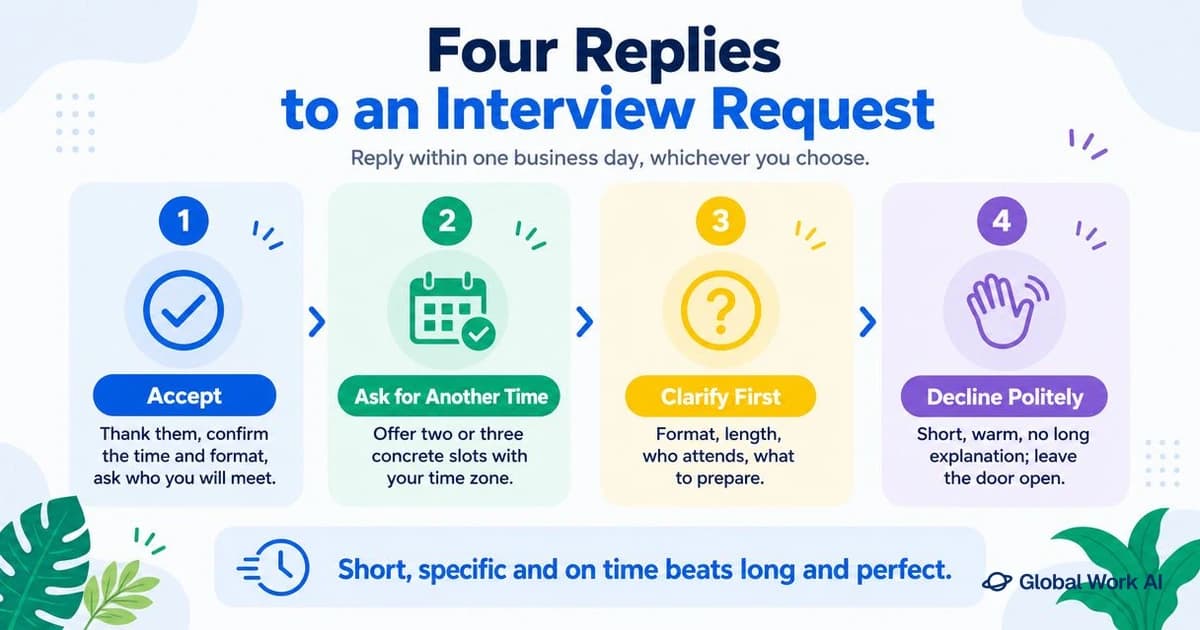
A professional response can be warm and straightforward. Thank the sender, confirm your availability, and ask for further information only if you need it.
Match the sender’s level of formality. “Hi [First Name]” often works well in an existing conversation. “Dear Mr. [Last Name]” is appropriate if you know the recipient uses that title; otherwise, use their name without guessing.
Reply in the existing email thread and keep the original subject line. This helps everyone follow the conversation.
If you’re starting a new interview response email, use:
Interview Confirmation — [Job Title] — [Your Name]
Subject: Re: Interview Invitation — [Job Title]
Hi [Recruiter’s Name],
Thank you for inviting me to interview for the [Job Title] position. [Weekday, Month Day] at [Time and Time Zone] works for me.
I have the [video platform] link and look forward to speaking with [Interviewer’s Name].
Best regards, [Your Name] [Phone Number, if useful]
This brief confirmation email works when you already have the information needed to attend.
For an in-person meeting, you could write:
I’ll meet you at [office address] and follow the arrival instructions in your email.
Only acknowledge details you’ve received. If the link is coming later, there’s no need to ask for it again unless it fails to arrive when expected.
Use a professional closing, such as “Best regards” or “Kind regards,” followed by your name and any useful contact details.
Subject: Re: Interview Availability — [Job Title]
Hi [Recruiter’s Name],
Thank you for the invitation. Of the times you suggested, [first date, time, and time zone] works best for me. I’m also available at [second date, time, and time zone].
Please let me know which time you’d like to confirm.
Kind regards, [Your Name]
List your preferred option first. Unless the booking system confirms it automatically, wait for confirmation before treating a suggested time as agreed.
If the proposed slot doesn’t work, express your interest and offer alternatives in the same message.
You don’t need to explain the conflict in detail. Specific availability helps the recruiter more than a long explanation.
Subject: Re: Interview Invitation — [Job Title]
Hi [Recruiter’s Name],
Thank you for inviting me to interview for the [Job Title] position. I’d be glad to speak with the team, but I’m unavailable at the proposed time.
Would either of these options work?
Both windows are in [Time Zone]. If neither works, please let me know whether other times are available.
Best regards, [Your Name]
Offer realistic options, preferably across different days. Don’t promise unlimited flexibility if your schedule is restricted.
Ask about anything that affects your ability to attend or prepare, such as the duration, location, participants, or an assessment.
If you need this information prior to confirming, explain briefly. For example, you may need to know whether the interview requires travel before agreeing to a time.
Subject: Re: Interview Invitation — [Job Title]
Hi [Recruiter’s Name],
Thank you for the invitation. I’m available on [Weekday, Month Day] at [Time and Time Zone].
Could you confirm whether the interview will be by phone, video, or in person, and how long I should allow?
I look forward to speaking with you.
Best regards, [Your Name]
For a virtual interview, check the platform and joining instructions. If the time zone is missing, ask before confirming:
The proposed time may work for me. Could you confirm which time zone it’s in?
If the invitation doesn’t name the participants, ask:
Could you share the names and roles of the people I’ll be meeting with so I can prepare?
Knowing who will attend helps you choose relevant examples and prepare to answer questions. Save broader questions about the team and responsibilities for the interview.
A phone screen is an initial conversation about your background, interest, and basic fit for the role. It often takes place with a recruiter before a more detailed interview.
Confirm the expected duration, who will call, and which number to use:
Thank you for the invitation. [Date] at [Time and Time Zone] works for me. You can reach me at [number]. Should I expect your call, or would you prefer that I call you?
Moving an agreed appointment calls for a brief apology, a clear request, and replacement times.
Subject: Re: Interview Confirmation — [Job Title]
Hi [Recruiter’s Name],
I’m sorry, but an unavoidable conflict has come up, and I need to reschedule our interview on [original date and time].
I remain very interested in the [Job Title] position. Would [first alternative] or [second alternative] work for the team? Both times are in [Time Zone].
Thank you for your flexibility.
Best regards, [Your Name]
Send the request as soon as you know. Giving notice respects the interviewer’s time and allows the hiring team to adjust.
If the meeting is imminent, use the contact method provided for urgent changes, then follow up in writing.
If the opportunity isn’t right for you, a short withdrawal closes the loop. You can demonstrate professionalism without giving a detailed explanation.
Subject: Re: Interview Invitation — [Job Title]
Hi [Recruiter’s Name],
Thank you for considering me for the [Job Title] position. I’ve decided to withdraw my application and won’t be moving forward with the interview.
I appreciate your time and wish you and the team well with the search.
Kind regards, [Your Name]
If you would genuinely welcome future contact, add:
I’d be happy to stay in touch about future opportunities in [area of interest].
Leave that sentence out if it doesn’t reflect your intentions.
The channel changes the length of your reply, but the essential information stays the same.
Return the call during business hours. If you reach voicemail, leave a clear message:
Hi [Name], this is [Your Name], returning your call about the [Job Title] position. I’m available [two windows, with time zone]. You can reach me at [number]. Thank you.
If you agree on a time by phone, ask for a calendar invitation or written confirmation.
Keep the reply short and maintain a professional tone:
Hi [Name], thank you for the invitation. I’d be happy to discuss the [Job Title] role. [Date] at [Time and Time Zone] works for me. Please let me know the format and next steps.
Offer your email address if moving the conversation would make scheduling easier. You don’t need to duplicate every message across channels.
Follow the invitation’s instructions. Check the displayed time zone before booking, then review the appointment in your calendar.
Send another email if requested, if the booking is uncertain, or if something needs clarification. An automated confirmation may already complete the process.
Avoid:
Job seekers sometimes overthink how enthusiastic to sound. A clear, courteous reply makes a positive impression without exaggerated praise or repeated expressions of excitement.
Check names, dates, time zones, attachments, and grammatical errors. Make sure your response email accurately reflects what you’re agreeing to.
Confirm the company name and role, remove unused template fields, and attach requested documents. Include professional references only if requested.
When converting time zones, label both times clearly. Don’t replace the recruiter’s proposed time with an unexplained local equivalent.
A clear confirmation shows strong communication skills and helps avoid unnecessary demands on the hiring manager’s time.


65% of our members find a job within the 1st month
We’ll help you get there too
Reply as soon as you see the invitation. Briefly apologize for the delayed response, confirm your interest, and ask whether an interview is still possible. Include your current availability.
Yes, if you have genuine interest. The conversation helps you assess a potential employer. If you already know you wouldn’t consider the role, decline.
No. This message handles the invitation and scheduling. A thank you note is normally sent after the interview to express appreciation for the conversation.
Check whether the difference is a time-zone conversion. If the details still conflict, ask the sender to confirm the correct appointment.
Once you have an interview scheduled, add a reminder and review the preparation instructions.
Research the company website and official social media accounts, prepare relevant examples, and choose questions to ask. Before a video meeting, test your internet connection, camera, and microphone. Practice speaking naturally and using attentive body language.
On interview day, keep the link or address accessible and allow time to get ready.
For further preparation, seehttps://globalwork.ai/en/blog/how-to-prepare-for-interview/how to prepare for an interview andhttps://globalwork.ai/en/blog/phone-interview-questions-answers/phone interview questions and answers.
04 Sept 2026
Who sits on the interview panel, who to look at when you answer, and how to handle several interviewers at once without losing the thread.
09 Sept 2026
Every interview is different, but the questions employers ask are surprisingly consistent.
09 Sept 2026
A step-by-step protocol for running a mock interview without a partner, from session setup to recorded answers. Includes a scoring rubric and a rule for what to fix on the second take.
04 Sept 2026
Learn the STAR method as a production system, not an acronym: a fill-in answer template, six reusable stories, a question-to-story map, and timing rules for live and recorded interviews.


